Most visitors to a mortgage broker’s website are anonymous. They might fill out a contact form with a name and a phone number. They might just browse and leave. Either way, the broker starts from nothing: no income, no debts, no credit range, no sense of whether this person is six months from buying or six minutes into browsing. Whatever happens next, a call, a text, an email, starts the same way, with the broker asking the same handful of questions just to get oriented.
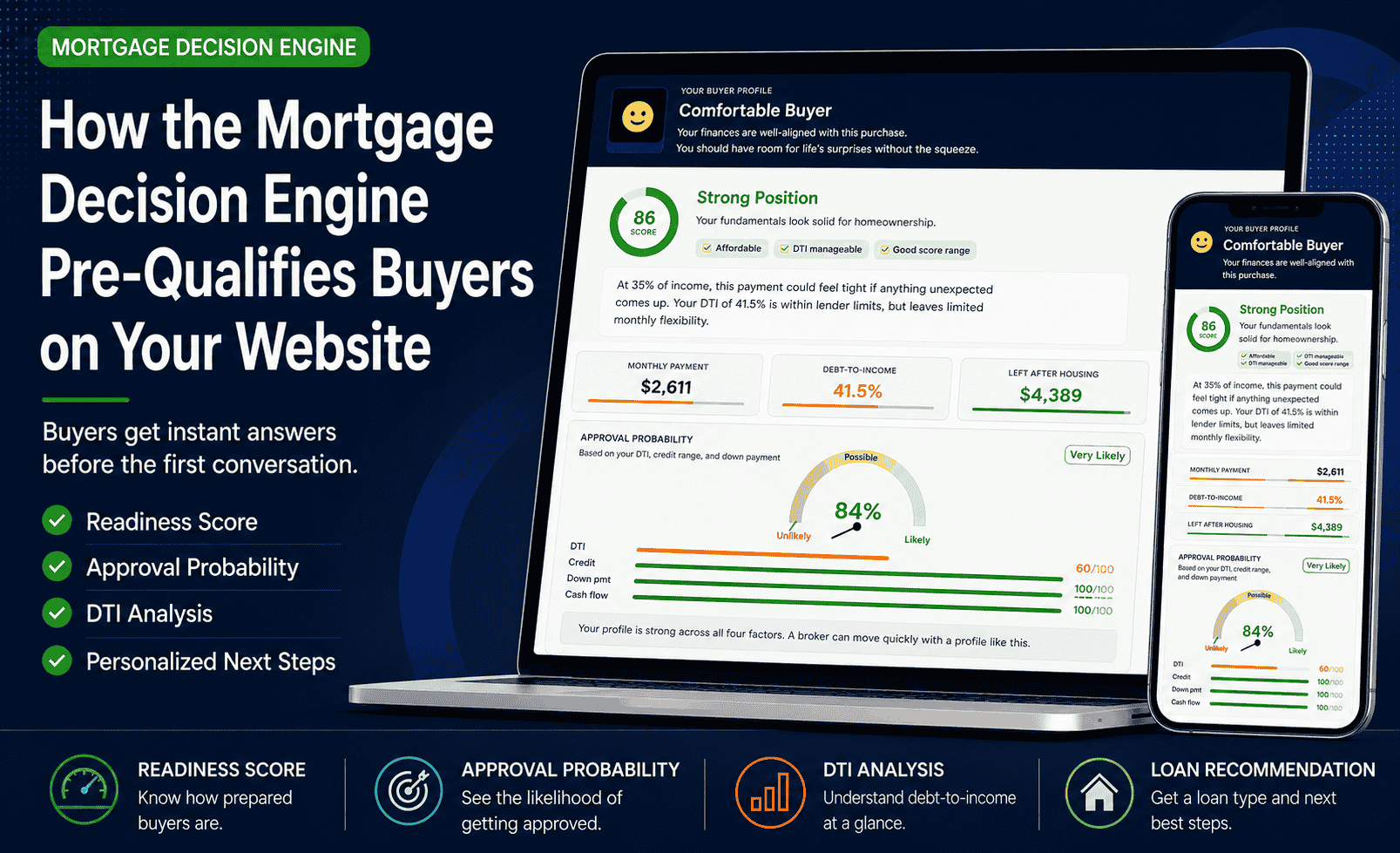
The Mortgage Decision Engine changes what a broker has to work with before that conversation even begins. Instead of starting from a name and a phone number, the visitor completes a short assessment directly on the broker’s website and walks away with a readiness score, a plain-language profile, and a recommended next step, all in about three minutes. This article walks through what that assessment actually produces: what the buyer sees on the broker’s site, what the broker can see if lead capture is turned on, and what a pre-qualified profile looks like compared to a blank contact form.
Starting From Zero
Income. Monthly debts. A rough credit range. How much is saved for a down payment. What price range, and when. These are the same handful of questions a broker asks at the start of almost every new conversation, because there’s no other way to get oriented. None of them are wrong to ask. They’re simply not the part that requires a broker’s expertise. Any form could collect them.
The part that actually requires a broker is what comes after: explaining which loan types fit, what the real monthly payment looks like once taxes and insurance are added, what would need to change to qualify for a better rate, and what to do next. But that part cannot start until the basics are known, and right now, for most website visitors, the basics aren’t known until someone reaches out and asks.
A broker handling a steady flow of inbound leads spends a meaningful share of every new conversation on intake rather than advice. Some of those end the same way: after fifteen minutes of basic questions, the answer is “let’s revisit this in a few months once a few things change.” That outcome is fine. It is just an expensive way to arrive at it, for both the broker and the buyer.
Put a number on it. A broker fielding twenty new inquiries a month, spending fifteen to twenty minutes on intake for each one, is spending somewhere between five and almost seven hours a month just collecting information visitors could have entered themselves, before any real conversation starts. That is not time spent advising, structuring loans, or building the relationships that generate referrals. It is time spent typing numbers into a worksheet while someone reads them off a screen.
Why Buyers Actually Use It
A visitor landing on a broker’s website has no obligation to fill out anything. Most don’t. The reason this particular tool gets completed instead of ignored is that it answers questions the buyer already showed up with, on the spot, before anyone asks for a phone number.
- They want to know if they’re ready. Not in the abstract, with their actual income, debts, and credit range plugged in.
- They want a realistic monthly payment. Not just principal and interest, the full picture including taxes, insurance, and PMI if it applies.
- They want a loan type recommendation. Most buyers don’t know the practical difference between FHA, conventional, VA, or USDA, and a recommendation based on their own numbers is a useful starting point.
- They want an answer immediately. No scheduling anything, no waiting for a callback, no “someone will reach out within 24 hours.”
- They want to test a few scenarios privately first. More down payment, a lower price range, paying off a debt, before discussing any of it with a person.
None of that requires talking to a broker first. That is the point. The tool gives the buyer something useful in exchange for three minutes, and what happens with that exchange on the broker’s side is what the rest of this article covers.
What the Buyer Sees on Your Website
The Mortgage Decision Engine walks a buyer through three short steps before they ever need to speak to anyone. The first step, The Home, asks about the property they’re considering: loan type preference, target price, down payment percentage, loan term, an expected interest rate, and estimated property taxes, insurance, and HOA fees if applicable. The second step, Finances, asks about household income, monthly debt payments, a credit score range, what monthly payment feels comfortable, and how much is available in total savings. The third step, About You, asks a few quick context questions: whether this is a first home, veteran or active military status, how soon they’re hoping to buy, and what the home is for.
From those answers, the buyer gets back a complete picture. A readiness score from 0 to 100. A plain-language profile describing where they stand. Their debt-to-income ratio and which zone it falls into. An approval probability built from four factors (DTI, credit, down payment, and cash flow) so they can see which one, if any, is holding their score back. A recommended loan type based on everything they entered. And a short list of personalized next steps written for their specific situation, not generic advice. There’s also a What-If Simulator, so a buyer who’s curious can test what happens if they put down more, wait a few months, or pay off a debt first, before ever discussing it with a broker.
A single 0 to 100 number that gives the buyer, and later the broker, an instant sense of where this lead stands before any conversation happens.
A plain-language summary of the buyer’s overall position, written so a non-finance person understands it immediately.
The buyer’s debt-to-income ratio and where it falls relative to lender thresholds, shown visually so the number means something.
A gauge built from DTI, credit, down payment, and cash flow, with each factor broken out so it’s clear what’s helping and what isn’t.
A recommended loan type based on the buyer’s actual inputs, useful as a starting point for the conversation rather than a blank slate.
A short list written for this buyer’s situation specifically, which tells the broker exactly what the buyer is expecting to hear about.
How the Readiness Score Is Built
The 0 to 100 score and the approval probability aren’t arbitrary. They’re built from the same four areas any underwriter looks at first, just compressed into a format a buyer can read in three minutes.
DTI carries the most practical weight because it’s the number most lenders use as a hard cutoff. A buyer with excellent credit and a solid down payment can still be ruled out of a loan type if DTI is too high, which is why it’s usually the factor that moves the score the most.
Credit affects more than whether someone qualifies. It affects the rate they’re offered, and the gap between a 680 and a 760 credit range can mean a meaningfully different monthly payment on the exact same loan amount.
Down payment affects loan-to-value, which determines whether PMI applies and, on some loan types, whether the buyer qualifies at all. A buyer sitting close to a common threshold, 10% or 20% down, often sees their score shift noticeably with a small change here.
Cash flow, what’s left over after the payment and existing debts, is the hardest factor to fix quickly because it reflects an ongoing budget rather than a one-time number. It’s often the most honest signal of how the buyer will actually experience the payment after closing.
None of this replaces a real underwriting review. What it does is give the buyer, and then the broker, a preview of where that review is likely to land, before either of them has spent time on a full application.
What the Buyer Gets in Return
The exchange is plain, and that’s part of why it works. Five inputs, five outputs, nothing hidden behind a “see results” button that turns out to be a contact form.
| Buyer Gives | Buyer Receives |
|---|---|
| Income | Readiness Score |
| Monthly Debts | DTI Analysis and Zone |
| Credit Score Range | Approval Probability |
| Down Payment | Loan Type Recommendation |
| Timeline and Purpose | Personalized Next Steps |
A form asks for information and gives nothing back until someone responds. This gives something back immediately, which is a different experience for the person filling it out, and a different starting point for the broker on the other end.
What Lands in Your Inbox
What happens to that profile after the buyer sees it depends on which version of the tool is running on the website. There are two paths, and both are useful in different ways.
With the free embed, the broker doesn’t automatically see the buyer’s results, but the buyer does. A buyer who already knows their DTI, their approval probability, and what loan type the tool recommended asks different questions than one who is starting from zero. The conversation still gets shorter, just from the other direction. With lead capture turned on in the white-label version, the broker gets the same head start the buyer just got, before the buyer ever reaches out.
Reading a Buyer Profile in Under a Minute
When a HOT LEAD alert arrives, there’s a quick order to read it in. Five things tell a broker almost everything they need before reaching back out.
The 0 to 100 score and the plain-language profile give an immediate sense of where this buyer stands overall. A high score with a strong profile means things can move quickly toward next steps. A lower score doesn’t mean skip it, it means there’s a specific area worth addressing early.
This single number affects loan type flexibility more than almost anything else in the profile. A DTI comfortably under the lender ceiling opens up options. A DTI close to the ceiling narrows them, and that’s worth knowing before suggesting a loan type.
The gauge is built from four factors: DTI, credit, down payment, and cash flow. When three of the four are strong and one is pulling the score down, that one factor is usually the entire conversation. Knowing which one it is in advance means the broker can come with a plan instead of discovering it live.
This is what the tool suggested based on the buyer’s own numbers. It’s not the final answer, but it’s a real starting point grounded in their inputs rather than a guess, and it gives the broker something concrete to open with or refine.
The buyer was shown a short list of personalized next steps before they ever reached out. That list is essentially a preview of what they’re hoping the broker will talk about. Reading it beforehand means the broker already knows the agenda.
Two real profiles make the difference concrete.
Income: $90,000/year ($7,500/month gross)
Monthly debts: $500
Credit range: 760+
Score: 86/100, profile “Comfortable Buyer”
DTI: 41.5%
Monthly housing payment: $2,611
Left after housing and debts: $4,389/month
Approval probability: 84%, Very Likely, with DTI as the only factor not at the maximum and credit, down payment, and cash flow all maxed out
What this tells the broker: Things can move quickly. There’s no factor that needs fixing first. The conversation can go straight to rate shopping, pre-approval, and timeline.
Income: $78,000/year ($6,500/month gross)
Monthly debts: $400
Target home: $320,000, 10% down
Monthly housing payment: approximately $2,391 (P&I, taxes, insurance, and PMI combined)
Back-end DTI: 42.9%, just under the 43% ceiling most conventional lenders use
Approval probability: lands in the “Possible” range rather than “Very Likely,” with credit, down payment, and cash flow all strong and DTI as the factor pulling the score down
What this tells the broker: Everything else about this buyer is solid. The DTI is the entire story, and it’s close enough to the ceiling that small changes matter. That’s exactly the kind of profile worth following up on, not skipping.
Two Brokers, Same Lead, Different Starting Points
Same buyer, same numbers as Profile B above. Here’s how the conversation goes depending on whether the broker had the profile beforehand.
The conversation opens with the standard questions. Income, debts, credit range, down payment, target price. Around minute twelve, the broker calculates DTI and realizes it’s sitting at 42.9%, right at the edge of what conventional lenders allow. The conversation has to pivot here, mid-discussion, while the broker works out in real time whether to suggest a different loan type, a lower price range, or paying down the $400 in monthly debt first. The buyer can sense the pivot. It doesn’t feel like a plan, it feels like a problem just got discovered.
The broker already knows the DTI is at 42.9% and that it’s the one factor holding the score back. The conversation opens differently: “Your numbers look strong overall, the one thing I want to walk through with you is your debt-to-income ratio, it’s close to the limit for conventional loans, and I have a couple of ways we can work with that.” One option: if $200 of that $400 monthly debt gets paid off before applying, back-end DTI drops to 39.9%, which meaningfully widens loan options. The buyer hears a plan in the first thirty seconds instead of a problem at minute twelve. Same numbers. Completely different first impression.
What Changes About the Conversation
The tool already suggested a loan type based on the buyer’s own numbers. Starting there, confirming or refining it, is a stronger opener than “tell me a bit about what you’re looking for.”
If one of the four approval factors is pulling the score down, raise it in the first minute with a plan attached. It reads as expertise rather than as a problem the buyer has to wait for someone to find.
The buyer was shown a personalized list of next steps before calling. Bringing those up by name signals that the broker already understands their situation, not just their phone number.
The buyer already answered income, debts, credit range, and down payment. Asking again signals that the information they provided didn’t actually matter, which undercuts the entire point of having them complete it.
A profile with a flagged factor is often the one that most needs a broker’s help, and converts well once a plan is on the table. The score tells you where to focus, not whether the lead is worth a call.
If the buyer ran scenarios in the simulator before calling, more down payment, a different rate, paying off a debt, those scenarios are exactly what they’re hoping to discuss. Asking “did you try adjusting anything in the simulator?” can open the most useful part of the call.
What Happens After You Install It
It helps to know what the first month actually looks like, not just the setup step.
Paste the embed code onto any page, a dedicated tools page, a sidebar, or your homepage. It’s live as soon as the page is saved. No waiting period, nothing else to configure.
Anyone who visits that page can complete the assessment right away. No approval step on your end, and no buyer needs to be invited or registered.
With the white-label version, this is when the HOT LEAD alerts start to feel routine, an email with a profile attached, ready to review before the callback. With the free embed, this is when buyers who used the tool start asking more specific questions on calls.
Every completed assessment is saved to your Google Sheet, including the ones where the buyer wasn’t ready yet. A month in, that’s a list of people who already told you their numbers, worth a follow-up call even if the first one didn’t lead anywhere.
Putting This to Work on Your Website
Getting started doesn’t require a decision about which version to use right away. The free embed is a single line of code that works on any website, WordPress, Wix, Squarespace, Webflow, or custom-built, and it’s free with no time limit. It carries an “OurNetHelps” footer and doesn’t include lead capture, but the buyer-side experience, score, profile, DTI, approval probability, loan type, next steps, and simulator, is the same engine.
The white-label version adds three things on top of that: your own branding instead of the OurNetHelps footer, lead capture that saves every completed assessment to a connected Google Sheet, and the HOT LEAD email alert that lands in your inbox the moment a buyer finishes. It’s a one-time setup fee with no monthly subscription, installed directly on your domain.
Let Buyers Pre-Qualify Themselves on Your Website
Copy one line of code and add the full Mortgage Decision Engine to your website today. No account, no setup, free with no time limit.
Get the Free Embed CodeA website visitor doesn’t have to stay anonymous. When the basic numbers are already on the table, the conversation can start where it actually matters.